I install REA with Claude Code and ask what YouTube's player does, then check every answer in the browser: where it is right and where it falls short.
 José Antonio Garrido
I wanted to know what YouTube’s player really does when you press play: what it downloads, what it sends while you watch, and how it decides the quality. The browser’s DevTools show you each request, but reading hundreds of requests and 13 MB of minified JavaScript by hand is not a plan. So I set up REA (Reverse Engineer Anything) with Claude Code and asked it those three questions.
REA is an open-source toolkit (MIT licence) that lets an agent inspect software without its source code: native binaries, Electron apps, Android APKs, WebAssembly and web pages. It works as a command line and as an MCP server. The official repository is morluto/rea and the npm package is rea-agents; several sites with similar names are not the project’s. I use version 6.8.0, the latest on npm as I write this.
I checked every one of REA’s answers another way: a network log of my own over the DevTools protocol, and the player’s own statistics panel. Where REA is right I say so, and where it falls short too.
What you need
- Node.js 24 (
npxcomes with it). - Claude Code, if you want to use it from the agent.
- Google Chrome.
- Nothing else. Ghidra, IDA or Hopper are only needed for native binaries. For a web page, REA brings everything it uses.
Install REA in Claude Code
setup shows you what it is going to change first, then applies it. Pin the version in every command, so everything you do is reproducible:
npx -y rea-agents@6.8.0 setup --client claude_code --dry-run
npx -y rea-agents@6.8.0 setup --client claude_code --yes
npx -y rea-agents@6.8.0 doctor --client claude_code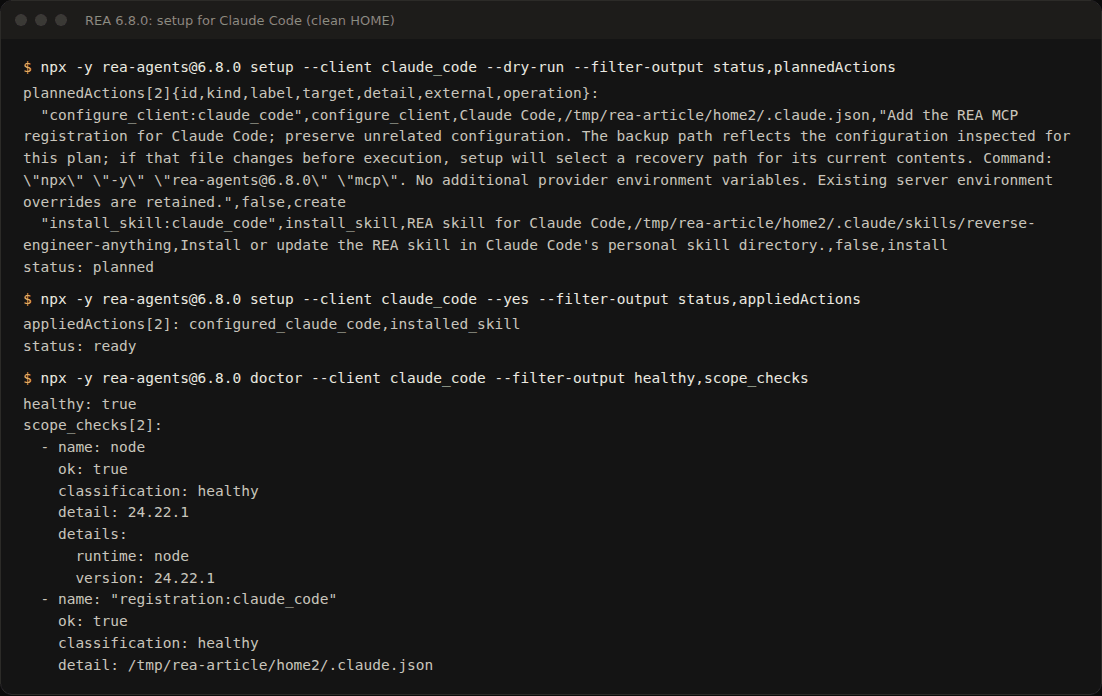
The plan has two actions: register the MCP server in ~/.claude.json as npx -y rea-agents@6.8.0 mcp, and install REA’s skill in ~/.claude/skills/. Afterwards, doctor reports healthy: true. It will tell you Ghidra, IDA, Hopper and JADX are missing: they are engines for other kinds of target and do not affect what follows.
I did it with an empty HOME, so as not to touch my own configuration and to see what you would see from scratch. If you would rather have REA in one project only, put this in its .mcp.json:
{
  "mcpServers": {
    "rea": { "command": "npx", "args": ["-y", "rea-agents@6.8.0", "mcp"] }
  }
}
Open a Chrome that REA can observe
REA watches the browser through the DevTools protocol. Open a Chrome with its own profile and the debugging port listening on your machine only:
google-chrome --remote-debugging-address=127.0.0.1 --remote-debugging-port=9333 \
  --user-data-dir="$(mktemp -d)" --mute-audio
A separate profile matters: whoever reaches that port controls the browser, so never use your everyday one. Open a video and reject the cookies. I used two: “Me at the zoo” (the first video on YouTube, 19 seconds) and Big Buck Bunny, by the Blender Foundation (CC BY licence), which is long enough and comes in several qualities.
Rejecting the cookies is not optional: while the notice is open, the video stops at 2 seconds and there is nothing to observe.
With the browser ready, REA can see it:
npx -y rea-agents@6.8.0 list-browser-targets http://127.0.0.1:9333Question 1: what the page loads before the video starts
The tool for this is capture-browser-scenario: REA navigates to the URL you give it, runs the steps you declare and records the network. This is the scenario I used:
{
  "browser": { "mode": "connect", "cdp_endpoint": "http://127.0.0.1:9333", "target_id": "<the id from list-browser-targets>" },
  "start_url": { "url": "https://www.youtube.com/watch?v=jNQXAC9IVRw" },
  "environment": { "service_workers": "allow" },
  "actions": [
    { "step_id": "player", "action": "wait_for", "locator": { "kind": "css", "selector": "#movie_player video" }, "state": "attached", "timeout_ms": 20000 },
    { "step_id": "watch", "action": "wait_for_timeout", "duration_ms": 25000 }
  ],
  "capture": { "at_end": ["url", "screenshot"], "events": ["network", "page-errors"] }
}
npx -y rea-agents@6.8.0 capture-browser-scenario scenario.json --format json > scenario-out.jsonThe "service_workers": "allow" line is not decoration. Without it REA refuses: YouTube registers a service worker and, by default, REA does not observe pages controlled by one. The error says exactly that and tells you what to change.
What REA saw. 81 requests in 28 seconds (85 in 29 when I repeated it on a clean profile). Before the first video request, which goes out at 1.3 seconds, the page asks for:
- the
/watchHTML; - 17 thumbnails from
i.ytimg.com; - the player (
/s/player/…/base.js) and the site’s modules; - three polyfills (
web-animations-next-lite,webcomponents-sd,intersection-observer); - the stylesheets and the fonts.
Right with the first video request come the player’s optional modules: offline.js, remote.js, miniplayer.js, captions.js, endscreen.js and annotations_module.js.
The check. On another load of the same video I logged the network myself, over the DevTools protocol. The same paths come out in the same order, tenths of a second apart; only a few recommendation thumbnails differ. And a detail I did not expect: the whole 19 seconds of video arrive in a single POST request to *.googlevideo.com/videoplayback, 480 KB of it.
How heavy it is. With analyze-web-bundle, REA counts 50 scripts and 13.7 MB of JavaScript on the page. Two of them take almost all of it: the site’s core (9.7 MB) and the player, base.js (2.6 MB). I downloaded both separately with curl and they match byte for byte, with the same hash; compressed, they travel as 2 MB and 0.7 MB.
Verdict: REA gets it right. Its inventory matches the browser’s.
Question 2: what the browser sends while you watch
I repeated the scenario with Big Buck Bunny and 90 seconds of playback, and compared it with my log again. They match request for request. While you watch, the browser does this:
POST *.googlevideo.com/videoplayback: every 3 to 9 seconds, while the buffer fills. Each response brings 0.5 to 1.1 MB of video, and each request carries 1.7 to 2 KB from the browser.POST /api/stats/watchtime: every 10 seconds (at 10, 20 and 30 s).POST /api/stats/qoe: at the start, then every 10 to 30 seconds.POST /api/stats/playbackandGET /ptracking: once, at the start.POST /api/stats/atr: once, at 2 seconds.POST /youtubei/v1/log_event: a couple of times while loading.
By 40 seconds in, the player already had 55 seconds of video downloaded ahead.
What REA adds. With observe-web-execution, REA gives each request’s call stack. The qoe report comes from the player, from a function called reportStats in base.js. The watchtime one comes from the site’s core, from sendThenWrite. In that capture, taken while I released the connection in question 3, both URLs carried fmt=397 and afmt=251. They are the same identifiers the player’s “Stats for nerds” panel (right-click on the video) shows next to the codecs: av01 (397) at 480p, av01 (394) at 144p and opus (251) for the audio.
Verdict: REA gets it right, and the call stack adds something the network tab does not give you at a glance.
Question 3: how it chooses the quality
This was the hard one. To force a change, I limited the connection to 300 kbit/s over the DevTools protocol (Network.emulateNetworkConditions) before opening the video. Halfway through the test I released it.
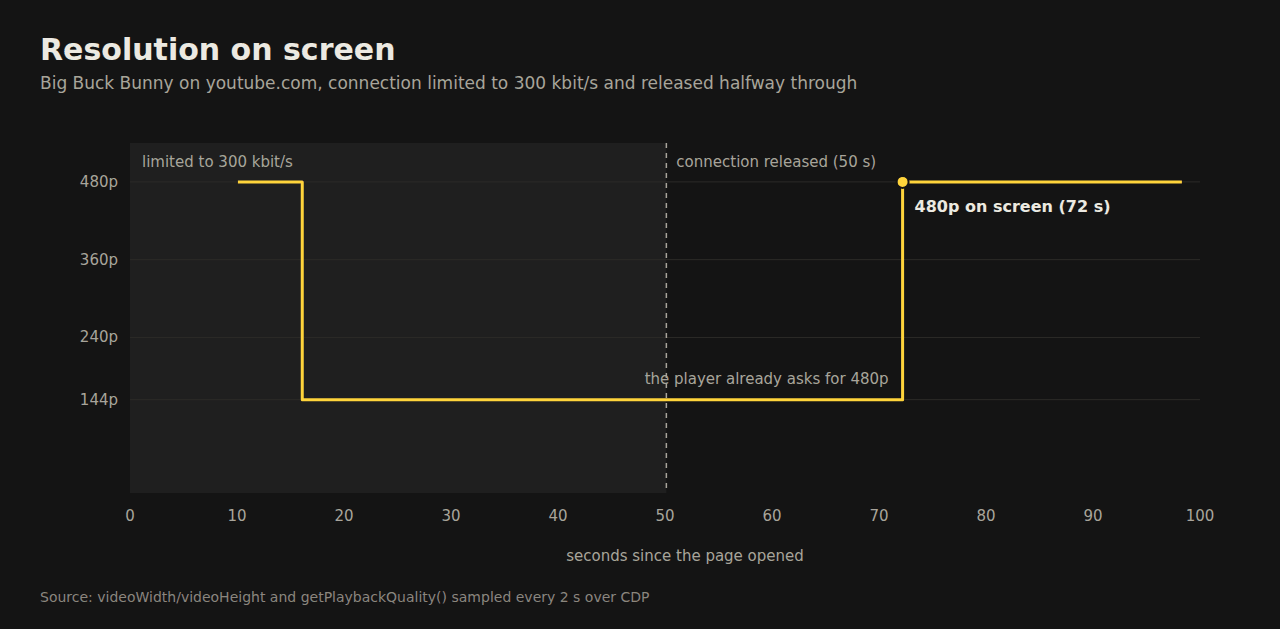
This is what the browser measured, sampling the resolution every 2 seconds:
- With the connection limited, the first 2 seconds play at 480p. At 6 seconds into the video the player drops to 144p.
- When the connection is released, the player starts asking for 480p at that very moment, and its buffer jumps from 22 to 59 seconds.
- But the picture stays at 144p until what was already downloaded has played. In this test it took 22 seconds. In another, 16. In a third it was still at 144p 32 seconds later, when the test ended.
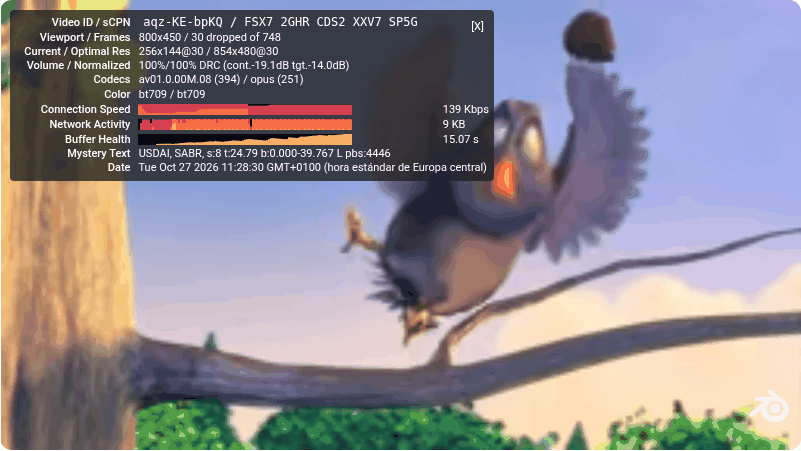
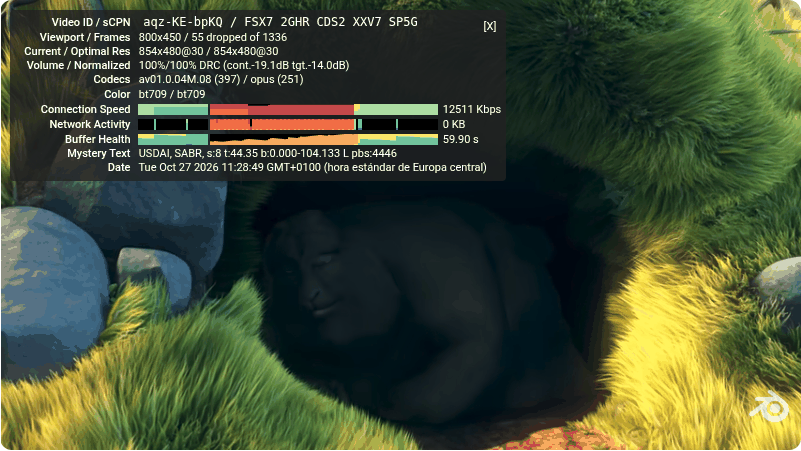
The panel confirms it: 256x144 against an optimal 854x480 at 139 kbps, then 854x480 at 12,511 kbps with 60 seconds of buffer. (My browser showed the panel in Spanish, as «Estadísticas avanzadas».) Its “Mystery Text” line says “SABR”, and the video arrives in POST requests that carry 1.7 to 2 KB from the browser each.
And an earlier experiment, the other way round: if you limit the connection after the buffer has filled, the quality does not drop. With 55 seconds already downloaded, the rest of the test (more than 40 seconds) played at 480p.
What REA did. I asked it where that decision lives in the code, and it did not get there.
analyze-web-bundleanalyses the JavaScript without running it. With its default settings (30 seconds per script), it ran out of time on exactly the two scripts that matter: the player and the site’s core, 12.4 of the 13.7 MB. I repeated it with 10 minutes per script and 6 GB of memory: 20 minutes and 4.6 GB later, the same result.observe-web-executionmeasures which functions run during a time window. I started it a few seconds before releasing the connection, with a 15-second window: in that time 1,022 of the player’s functions ran. Almost all have minified names (uHa,pz,Dz…). The only readable ones are browser APIs, such asappendBuffer, which puts the pieces of video into the buffer, andgetPlaybackQuality.
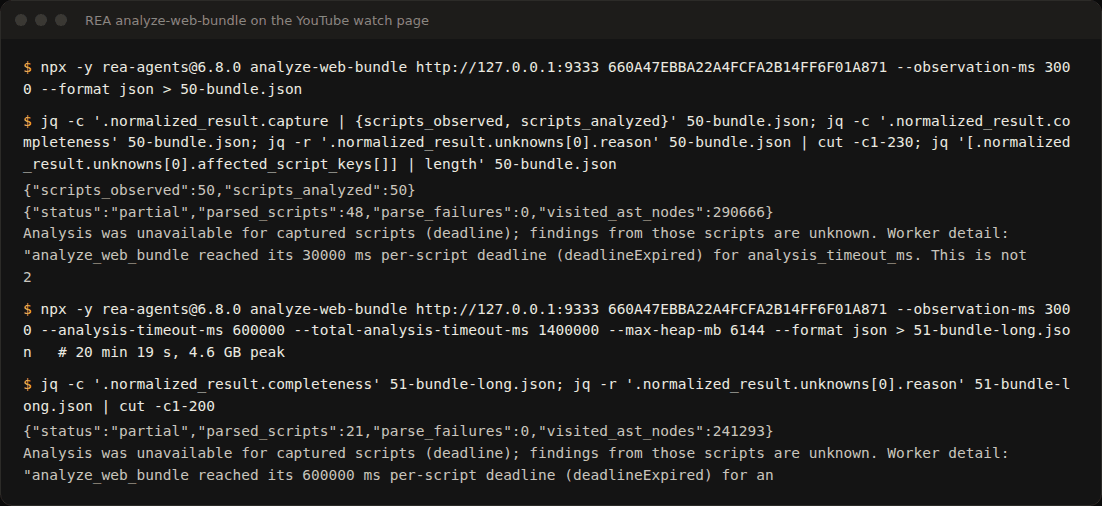
Verdict: REA did not find where the quality is decided. What I know about question 3, the browser measured.
Use it from Claude Code
With the MCP server registered, you ask Claude Code in plain language. I tried it three times with claude -p, and the result depended a lot on the prompt:
- A prompt that does not name the tool, with at most 12 turns. Claude used
inspect_web_page, but REA’s answer was 1.17 million characters long. That exceeds Claude Code’s output limit for an MCP tool, so it saves it to a file, and the agent spent its 12 turns reading it without answering. Along the way it tried to passhttps://*.googlevideo.comas an allowed origin, and REA refused: it only accepts exact origins, and the video servers change name every session. - The same prompt, again. This time it chose
observe_web_session, which only records the page’s navigation, not its requests. It answered, rightly, that it could not tell me anything. - A prompt that names the tool, its parameters, and to read the file with
jq. Seven turns and 50 seconds.
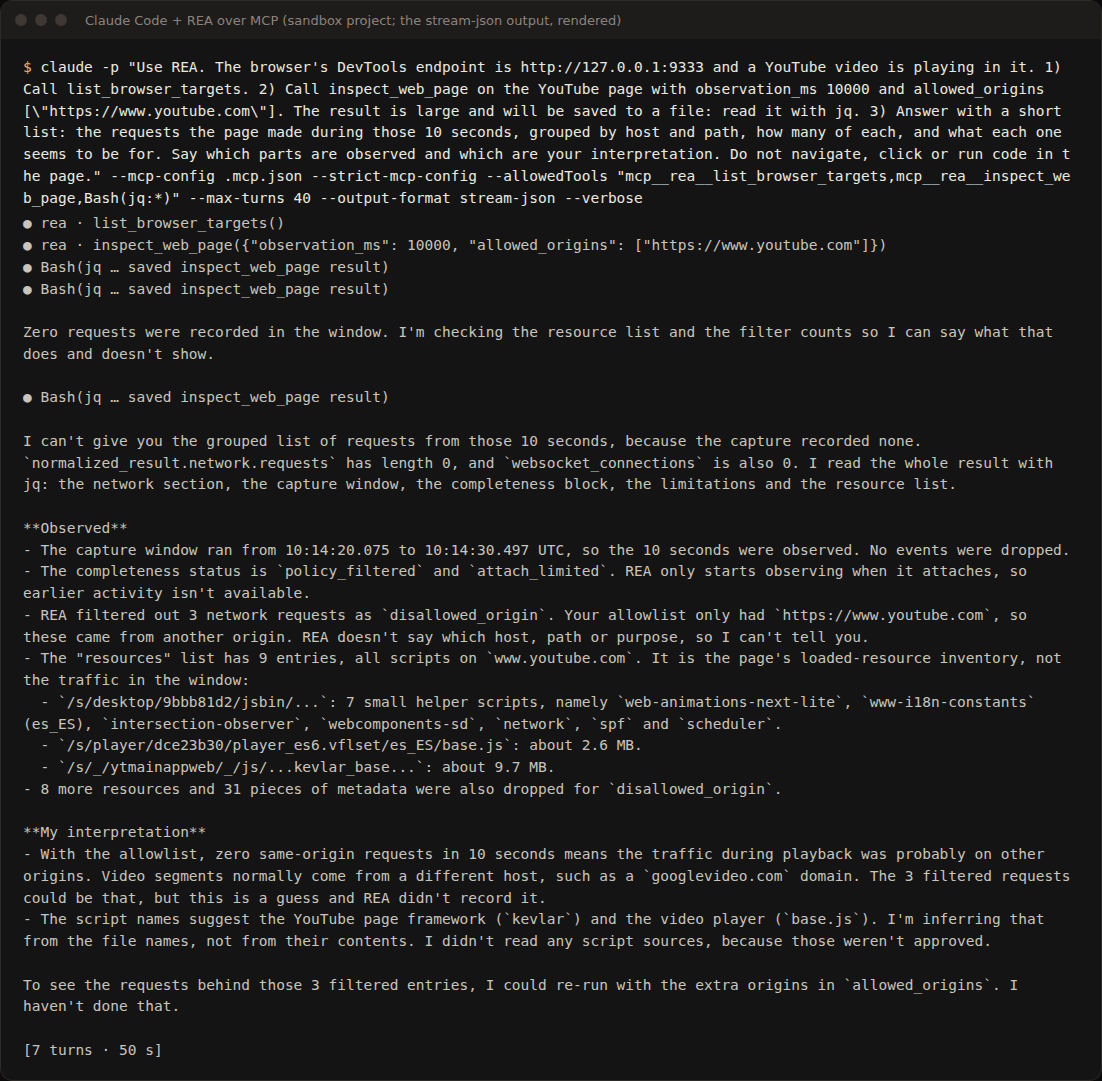
In those 10 seconds the page made no request to www.youtube.com. REA filtered 3 to other origins because they were not allowed, and Claude says so, separating what it observed from its interpretation. The lesson: tell it which tool to use and which origins, and be ready to read large results from a file.
What REA gets right and what it does not
- It gets the network inventory right: it matched my log request for request in every test.
- It adds each request’s call stack, which tells you which script and which function sent it.
- It warns well. Every output lists its limits, for instance that observation starts when it connects or which requests it filtered by origin, and its errors say what to change.
- It does not get through static analysis of a bundle like YouTube’s: the two scripts that matter are left unanalysed, even with 10 minutes per script.
- It gives no useful names in minified code: it knows which functions ran, not what they do.
- It asks for judgement from the agent. Picking the wrong tool (navigation only) or asking for a million-character result are easy mistakes.
Repeat it
With Chrome open as above and a video playing:
npx -y rea-agents@6.8.0 setup --client claude_code --yes
npx -y rea-agents@6.8.0 doctor --client claude_code
npx -y rea-agents@6.8.0 list-browser-targets http://127.0.0.1:9333
npx -y rea-agents@6.8.0 capture-browser-scenario scenario.json --format json > scenario-out.json
npx -y rea-agents@6.8.0 observe-web-execution http://127.0.0.1:9333 <target_id> --observation-ms 15000 --format json > execution.json
npx -y rea-agents@6.8.0 analyze-web-bundle http://127.0.0.1:9333 <target_id> --observation-ms 3000 --format json > bundle.json
The outputs are large JSON; jq is your friend. For example, jq '.normalized_result.events.items | length' scenario-out.json counts the network events.
Limits
All of this is observing what your browser already downloads and already sends, the same you would see in DevTools, and explaining it. I did not touch anyone’s session, the ads, or the video’s protections, and I downloaded no videos. If you analyse a site, respect its terms of use.